
Cyber Protection
Complete Defense Against
Cyber Threats and Ransomware

#1
Anti-Ransomware & Malware
Cloud Backup
Disaster Recovery
Anti-Ransomware & Malware
Cloud Backup
Disaster Recovery
Comprehensive Protection Against Cyber
Threats, Malware, and Ransomware
Cloudmatika Cyber Protection is an integrated solution for Cyber Security, Backup, and Endpoint Protection that seamlessly fits into your existing systems. With multilayered security and fast data recovery, your business stays protected from all types of cyber attacks.

Anti-Ransomware & Anti-Malware Advanced Protection
Protect your systems from advanced ransomware and malware with real-time automated detection and prevention.

Comprehensive & Real-Time Data Protection
With continuous data protection, your critical business data remains secure and can be quickly restored during any incident, ensuring smooth, uninterrupted operations.

Trusted Security for Every Endpoint
Integrated backup and antivirus solutions provide complete protection for all devices across your network, delivering stable and reliable security at all times.
Learn More About
How Cyber Protection Features Work
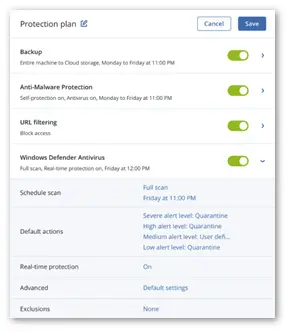
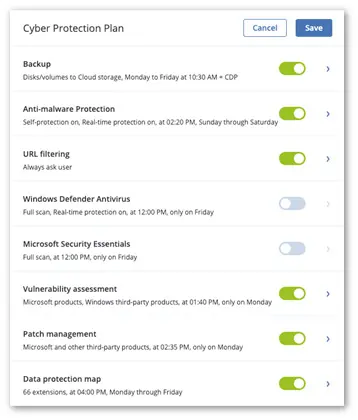
One Protection Plan
Covers all cyber protection aspects:
- Backup
- Anti-malware protection
- URL filtering
- Vulnerability assessment
- Patch management
- Data discovery (via data protection map)
- Windows Defender Antivirus and Microsoft Security Essentials management
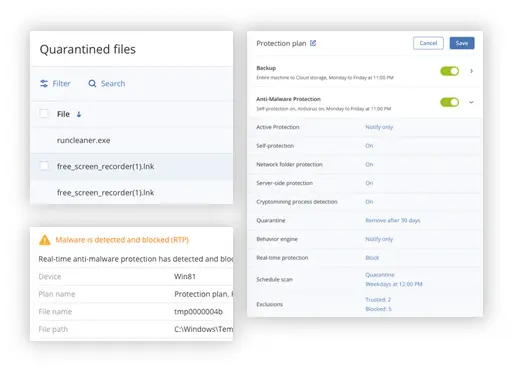
Anti-Malware Protection
Full-stack anti-malware protection for Windows and macOS
- Anti-malware feature in Cyber Protection will provide real-time protection and detect various types of cyberattacks such as Cryptomining detection and Ransomware detection.
- Cyber Protection also performs on-demand scanning, self-protection, network folder protection, overall server protection, and file quarantine.
- You can also perform exclusion, where you can choose which files, folders or patches you don't think need to be scanned.
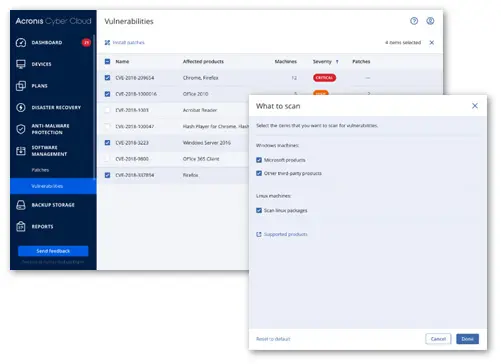
Vulnerability Assessment
Discover an issue before an issue happens
- Continuous, daily update of Acronis’ vulnerability and patch management database
- Support for:
- Microsoft:
- Workstations – Windows 7 and later
- Server – Windows Server 2008R2 and later
- Microsoft Office (2010 and more) and related components
- .NET Framework and server applications
-
Adobe, Oracle Java
Browsers and other software
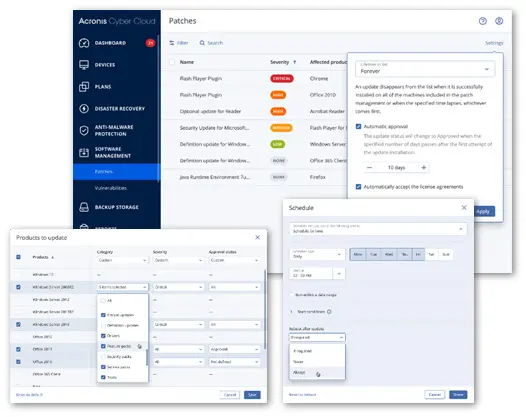
Patch Management
Fix an issue before an issue happens Large common vulnerabilities and exposures database, 250-300 new CVEs weekly
- Auto-approval of patches
- Deployment on a schedule
- Manual deployment
- Flexible reboot and maintenance window options
- Staged deployment
- All Windows updates including MS Office, and Win10 apps
- Support for patch management of Microsoft and third-party software on Windows
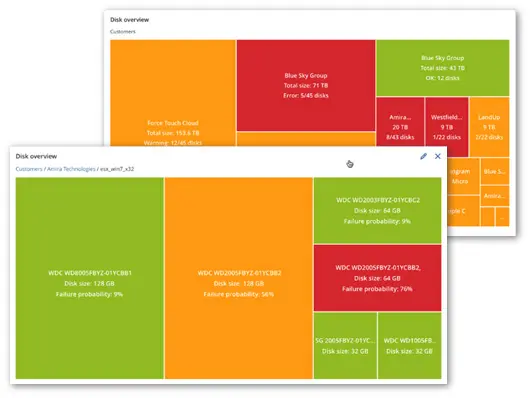
Drive Health Monitoring
Know about a disk issue before an issue happens
- Uses a combination of machine learning, S.M.A.R.T. reports, drive size, drive vendor, etc. to predict HDD/SSD failures
- The machine-learning model allows 98.5% predictions accuracy (and we keep improving it)
- Once a drive alert is raised, you can take action, for example backup critical files from the failing drive
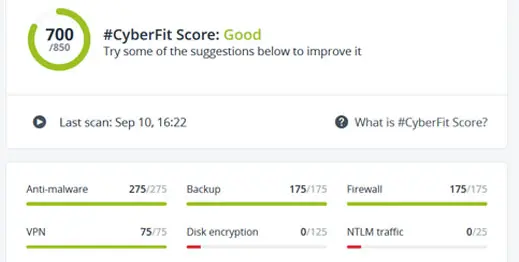
- CyberFit assesses and scores various security metrics to identify gaps in your IT environment and endpoints.
- It then recommends ways to improve your security posture. CyberFit Score is based on the NIST Cybersecurity
- Framework and assesses the critical security configurations for protecting endpoints and environments.
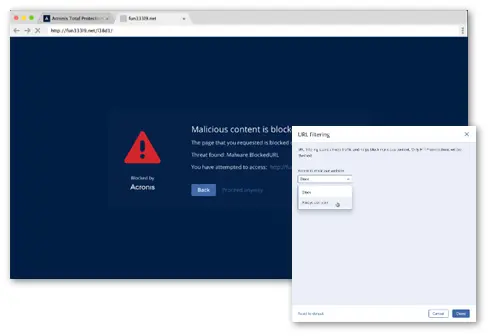
URL Filtering Controls Access to Malicious URLs
Control access to internet websites by permitting or denying access to specific websites based on information contained in an URL list
- HTTP/HTTPS interceptor
- Black/whitelists for URLs
- Payload analysis for malicious URLs
- Cloudmatika URL Filtering List:
- Cloudmatika own signatures
- AI-based detection (currently in Beta)
- Licensed signatures and intelligence from partners like Bitdefender, https://apwg.org/, etc
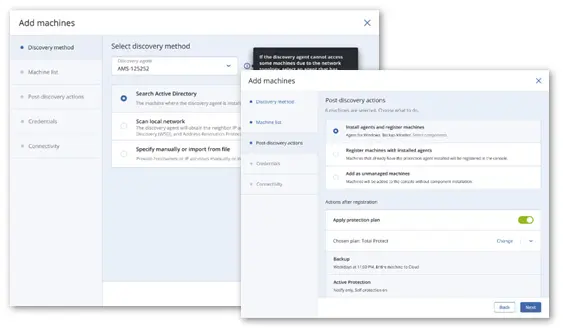
Devices Auto-Discovery and Remote Agent Installation
Simplify the process of installing multiple agents at once – in the cloud and on-premises
- Network-based discovery
- Active Directory-based discovery
- Import a list of computers from the file
- Auto-apply a protection plan
- Batch remote agent installation with a discovery wizard
Windows Defender Antivirus or Microsoft Security Essentials Management
- Enforce settings across multiple machines
- Collect all Windows Defender Antivirus and Microsoft Security Essentials detection events and display them in the management console
Flexible Monitoring and Reporting
- Hardware health monitoring (HDD, SSD)
- Active alert control
- Missing updates control
- Customizable dashboard widgets
- Quickly identify problems
- Fast access to management actions
Comprehensive Cyber Protection Features
for Your Business Security
Cyber Protection is designed to deliver end-to-end security for all business needs. This solution provides easy, efficient, reliable, and secure cyber protection for all data, applications, and systems, whether hosted on local servers, remote environments, private or public clouds, or mobile devices.
| Features of Cloudmatika Cyber Protection | ||
|---|---|---|
| Standard | Advance | |
| Workstation, Server Backup (Windows, Linux, Mac) | ||
| Virtual Machine Backup | ||
| File Backup | ||
| Image Backup | ||
| Application backup: Microsoft 365, G Suites, Microsoft Exchange, Microsoft SQL | ||
| Local Storage Backup | ||
| Cloud Storage Backup | ||
| NAS (Synology) Backup | ||
| Antivirus and anti-malware protection | ||
| Windows Defender Antivirus management | ||
| Microsoft Security Essential management | ||
| Data Protection Map | ||
| Threat Feed and Smart Protection Plan | ||
| Continuous Data Protection | ||
| Intel TDT (Threat Detection Technology) | ||
| HDD Health Extended | ||
| Safe recovery of backups | ||
| Scan backups for malware | ||
| Endpoint Detection and Response (EDR) | ||
Cyber Protection Licenses
Cyber Protection offers flexible licensing. Choose the option that best fits your company’s needs.
The average weekly increase in cyberattacks per organization in Q3 2024!
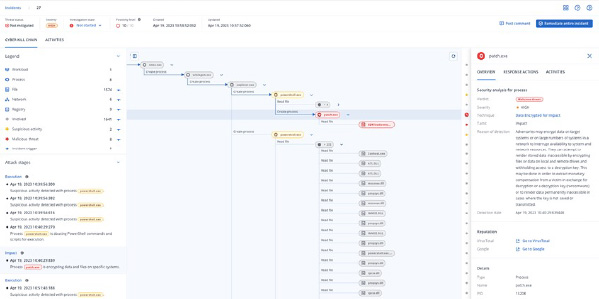
Cyber Protection delivers advanced security equipped with EDR to protect, detect, and respond to every cyber attack!
Advance Security + EDR (Endpoint Detection and Response)
Detection of advanced and unknown threats, along with
insightful threat investigation and response.
Assist Your IT Team Quickly and Efficiently in Analyzing Attacks
Cyber Protection Advanced Security + EDR helps your team analyze attacks within minutes, enabling fast and accurate response whenever a threat occurs.
Cyber Protection Support
More Than 20+ Platforms
PC
Server
Point
Directory
EC2
Server
KVM
Virtualization
VM Server
Database
XenServer
vSphere
Cyber Protection FAQ
You can. Cloudmatika Cyber Protection is an integrated anti-malware, ransomware, and backup solution. You can manage all your data security needs, from monitoring to performing regular backups, through a single dashboard.
No, therefore it is highly recommended to use Cyber Protection services to safeguard your company’s critical data from cyber attacks. Consult with us now.
Cyber Protection Advance License provides features and advantages in terms of security, such as centralized management of backup plans, backup tapes, SAN storage, snapshots, etc.
- advanced license is required on the following hypervisors: XenServer, KVM, RHV, and Oracle VM Server.
- Standard License can be used on VMware vSphere, Microsoft Hyper-V, and Virtuozzo. Contact us for a demo
EDR (Endpoint Detection and Response) is an active endpoint security solution that monitors continuously and in real time by correlating patterns and suspicious activities at the endpoint level. EDR works to detect security incidents, resolve incidents at the endpoint level, investigate security incidents, and provide remediation guidance.
Let’s Get in Touch
Our Cloud Consultant
will Assist you
WhatsApp 08:00 - 18:00 WIB
Phone Call - 09:00 - 17:00 WIB